
Alternative · Pencil.dev
Best Pencil.dev alternative for design.
SankiWork is the fully local-first alternative to Pencil — an agent-native design workspace you drive with the coding agent you already use, your key, your files, and a portable design system you keep in your repo.
Pencil (pencil.dev) is an agent-driven design tool from a16z Speedrun that puts a Figma-like vector canvas inside your IDE and keeps its design as .pen JSON files in your repo, versioned with Git. A local MCP server lets your coding agent read and write those files, so a prompt becomes an editable UI you can then hand to a coding agent for production code. It launched publicly in early 2026, crossed 100,000 users, and is genuinely good — with the catch that the app itself is closed-source, tuned first for Claude, and free only while it is in early access.
SankiWork is the fully local-first alternative: an agent-native design workspace you point your own coding agent at (Claude Code, Codex, Cursor, Gemini, OpenCode, Qwen) over BYOK. These two are unusually close — both agent-driven, both keeping design as files in your repo. The differences are ownership and range: with SankiWork the whole app runs locally (not just a documented format), BYOK is provider-neutral, and the output spans UI, decks, prototypes, and a portable DESIGN.md. This page is honest about where Pencil genuinely wins.
01
What Pencil is
Pencil (pencil.dev) is “design on canvas, land in code” — an infinite vector design canvas that lives inside your IDE and codebase, built by Tom Krcha (previously behind Around, acquired by Miro) and backed by a16z Speedrun. Its design files use an open, documented .pen JSON format that sits in your repo under Git, and a local MCP server lets AI agents read and write them. You prompt or draw on the canvas, then hand the design to a coding agent (Claude Code and others) to generate production components that match your stack.
As a design surface, Pencil is polished: a real vector canvas with layers, a properties inspector, drag-and-drop components, prompt blocks you place directly on the canvas, native Figma copy-paste that preserves layers and auto-layout, and built-in UI kits (Shadcn, Lunaris, Halo, Nitro). Manual canvas edits do not consume agent tokens.
What to know before you commit: the Pencil application is closed-source (only the .pen format is documented, and it can change), it is optimized for Claude Code with a weaker experience on other models, it is free only in early access (“Free is not a business model,” per the founders), and reviewers note it is still early — occasional crashes and no autosave.
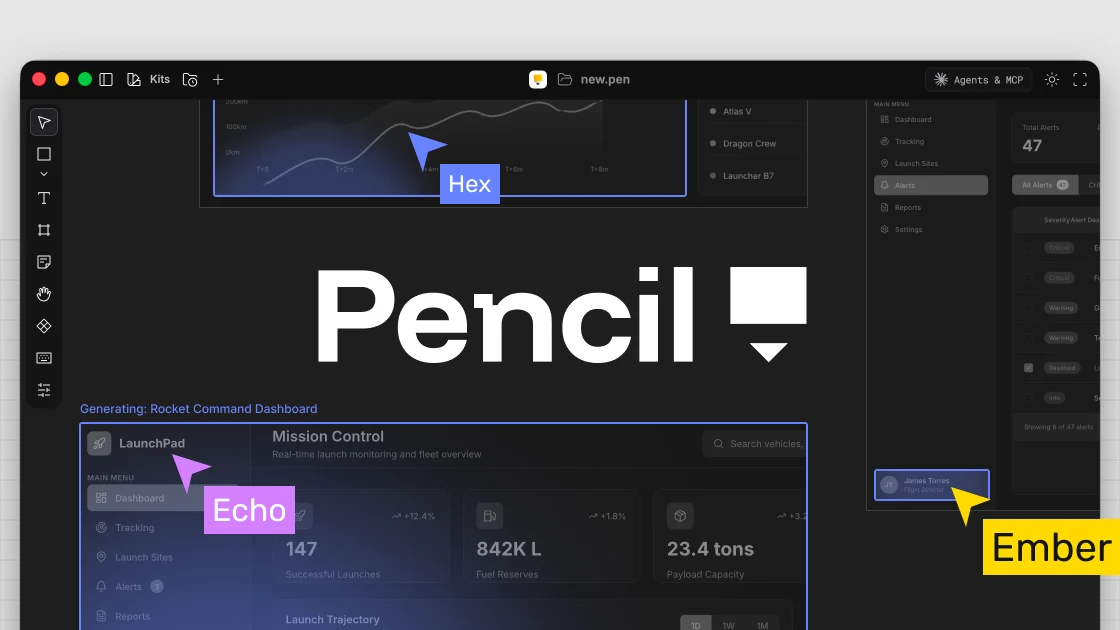
- Vendor: Pencil (pencil.dev), a16z Speedrun — closed-source app, ~100,000 users, launched early 2026
- Runtime: local desktop app + IDE extension (Cursor / VS Code / Windsurf) + local MCP server
- Design files: open .pen JSON format in your repo, Git-versioned
- Model: MCP with several agents, optimized for Claude Code; you bring your own agent subscription
- Pricing: free in early access, no published caps yet — paid plans signaled
02
SankiWork vs Pencil, feature by feature
| Feature | SankiWork | Pencil (pencil.dev) |
|---|---|---|
| License | Local-first — the whole app runs on your machine | Closed-source app; only the .pen format is documented |
| Runtime | Local daemon + desktop app | Local desktop app + IDE extension + local MCP server |
| Design files | Files in your repo (Git): DESIGN.md, artifacts | .pen JSON files in your repo (Git) |
| Account | None required; runs locally | Account / sign-in (early access) |
| Pricing | Free & local-first; your own model spend | Free in early access; paid plans signaled |
| Model | BYOK, provider-neutral — Claude, Codex, Cursor, Gemini, Qwen | MCP with several agents, optimized for Claude Code |
| Primary surface | Agent-driven (prompt → artifacts) + web UI | Figma-like vector canvas you edit directly; agent via MCP |
| Output | UI, landing pages, decks, prototypes, design systems | UI screens/components → code (matches your repo) |
| Design system | Portable DESIGN.md every skill enforces | Variables/Components + built-in UI kits (Shadcn, Lunaris…) |
| Figma import | Via agent (paste/screenshot → DESIGN.md) | Native copy-paste (preserves layers, auto-layout) |
| Collaboration | Single-user local; agent-driven | No human multiplayer; SWARM = multiple AI agents |
| Self-host / fork | Yes (local-first) | No — app is closed-source |
| Maturity | Stable releases | Early access — crashes, no autosave reported |
Read it honestly: Pencil wins on the hands-on canvas — a mature, Figma-like surface you edit directly, with native Figma paste and built-in UI kits, right inside your IDE. SankiWork wins on ownership and range — the whole app runs locally (not just the file format), BYOK is provider-neutral instead of Claude-first, “free” stays free because there is no vendor to monetize you, and the output spans UI, decks, prototypes, and a portable design system as files you keep.
03
Why teams look for a Pencil alternative
Pencil is a strong way to design inside your IDE, and for a lot of “developers who design” it is a great fit. The reasons people still look for an alternative cluster around what happens after the early-access honeymoon — ownership, provider lock-in, and scope.
- The app is closed, only the format is open: Pencil’s .pen format is documented, but the application is closed-source and a16z-backed, and the format spec reserves the right to change. SankiWork is local-first end to end — run it, audit it, self-host it, and own every artifact it produces.
- “Free” has an expiry date: Pencil is free while it is in early access, but the founders are explicit that “Free is not a business model.” Paid plans and limits are coming. SankiWork is free to use; you only ever pay your own model spend.
- It is Claude-first: Pencil connects several agents over MCP but is tuned for Claude Code, with a weaker experience elsewhere. SankiWork is provider-neutral BYOK — Claude, Codex, Cursor, Gemini, OpenCode, and Qwen are all first-class.
- You want more than UI-to-code: Pencil is focused on UI → code. SankiWork renders UI, landing pages, decks, prototypes, and a portable DESIGN.md design system from the same brand, all as files in your repo.
04
Local-first + BYOK, explained
Both tools are local-first and keep design as files in your repo — that part is common ground. Where SankiWork differs is that the whole application runs locally, not just a documented file format, so you can self-host it. Your brand lives in your repo as a portable DESIGN.md every skill respects.
You also bring your own agent key, provider-neutral. Credentials stay in local config or environment variables — SankiWork never proxies them — and the API spend bills directly to you, at your provider’s rates, with no vendor cap after early access.
New to the idea? Read what vibe design is, browse the plugin and design-system library, see all SankiWork comparisons — including Figma and Google Stitch — or download SankiWork to try it.
05
Where Pencil genuinely wins — and which to pick
Credit where it is due: as a design surface, Pencil is excellent. It is a real, Figma-like vector canvas you edit by hand — layers, a properties inspector, drag-and-drop components, and prompt blocks placed directly on the canvas — with native Figma copy-paste that keeps layers and auto-layout, plus built-in UI kits (Shadcn, Lunaris, Halo, Nitro). And it all lives right inside your IDE, so a developer who designs never leaves Cursor or VS Code. If what you want is a polished canvas to manipulate directly, Pencil’s surface is more mature than SankiWork’s agent-first flow today. The trade-off is everything structural around it: closed-source app, Claude-first tuning, and a “free” that the founders have said will not last.
A quick way to decide by what you actually want to do — the two overlap, so the honest split matters:
| If you want to… | Best pick |
|---|---|
| Own the whole tool as local-first you can fork/self-host | SankiWork |
| Keep “free” free with no vendor cap after early access | SankiWork |
| Use provider-neutral BYOK (not Claude-first) | SankiWork |
| Render UI + decks + prototypes + a design system | SankiWork |
| Edit a mature, Figma-like vector canvas by hand | Pencil |
| Paste from Figma with layers and auto-layout intact | Pencil |
| Design inline inside Cursor / VS Code | Pencil |
06
Moving a design from Pencil into SankiWork
Both tools keep design as files in your repo, so there is no lossy cloud export to fight — moving over is design-first. Extract your brand once and every render after inherits it.
- Install SankiWork from the download page and bring your own agent key (Claude Code, Codex, Cursor, Gemini, OpenCode, or Qwen).
- Point your agent at a Pencil export, a Figma paste, or a screenshot whose look you want to keep.
- Ask the agent to extract the brand — colors, type, spacing — into a DESIGN.md file in your repo.
- Pick a skill and render it against your new brand to confirm it matches.
From then on, every skill renders in your brand — and the UI, code, and design system stay in your repo as files you own under version control.
FAQ
FAQ
-
01 Is Pencil (pencil.dev) open source?
Not the app. Pencil is a closed-source, a16z-backed product; what is “open” is the .pen file format, which is documented but can change (the team reserves the right to make breaking changes). SankiWork keeps the entire design workflow on your machine — local-first and self-hostable.
-
02 Is Pencil.dev free?
It is free today, but explicitly in early access. The founders have said “Free is not a business model,” signaling future paid plans and limits. SankiWork is free to use; you bring your own agent key, so model spend bills to you with no vendor-set cap.
-
03 What is the difference between SankiWork and Pencil?
They are close — both are agent-driven and keep design as files in your repo under Git. The differences: SankiWork is provider-neutral BYOK, local-first, and agent-native (not tuned mainly for Claude), and renders a wider range of artifacts (UI, decks, prototypes, design systems). Pencil offers a more mature hands-on vector canvas and native Figma paste.
-
04 Does Pencil work with agents other than Claude?
Yes — it connects several agents over MCP (Cursor, Windsurf, Codex, and others), but it is optimized for Claude Code and reviewers report a weaker experience with other models. SankiWork treats Claude, Codex, Cursor, Gemini, OpenCode, and Qwen as first-class.
-
05 Is SankiWork affiliated with Pencil?
No. SankiWork is an independent project (gitea.com/Sanki5211/sankiwork-community, local-first). Pencil is a separate, a16z-backed product at pencil.dev; this is an unaffiliated comparison.
Own the whole tool, not just the file format.
Star the repo, grab the desktop build, or run the install in your terminal. SankiWork keeps everything local — your UI, code, and DESIGN.md system stay in your repo from the first render onward.